
For a single subject, use the official FINTRAC registry; for filtering and retention, download this site's 2026-09-11 CSV or Excel copy. Match name, number, address and website first, then read status against expiry, and re-check the official entry point for the latest record before any material verification.
KEY TAKEAWAYS
Key takeaways
- This site provides copies of the official files downloaded on 2026-09-11 and keeps a link to the latest official version.
- First-time users should start with Excel: filter by name or registration number, and clear the previous filter before switching to another subject.
- Cross-check name, number, address and website; identical names or several matching records cannot simply be merged.
- Read registration status and expiry date together; FINTRAC registration is not a licence, regulatory endorsement or guarantee that a transaction is safe.
Official lookup entry point and CSV/Excel downloads
To check one company, open the FINTRAC official lookup page directly. If you need to filter rows in a spreadsheet or keep a working record of the search, download the English registry files below.
Download the Excel copy from this site Download the CSV copy from this site View the latest official version
Download date of this site's copies: 2026-09-11. Both files come from FINTRAC with the original data intact: nothing was translated, deleted or reordered. The official page labels the Excel download as the "XLS version"; the file itself is .xlsx. These local copies do not update themselves, so before any material verification, re-check or re-download through "View the latest official version".
Dataset name: Money Services Business Registry. Publisher: Financial Transactions and Reports Analysis Centre of Canada (FINTRAC). The official Excel source file and the official CSV source file are directly accessible. The open data record uses the Open Government Licence – Canada. Contains information licensed under the Open Government Licence – Canada. This site publishes an independent usage guide; reuse does not mean FINTRAC endorses this site or any business.
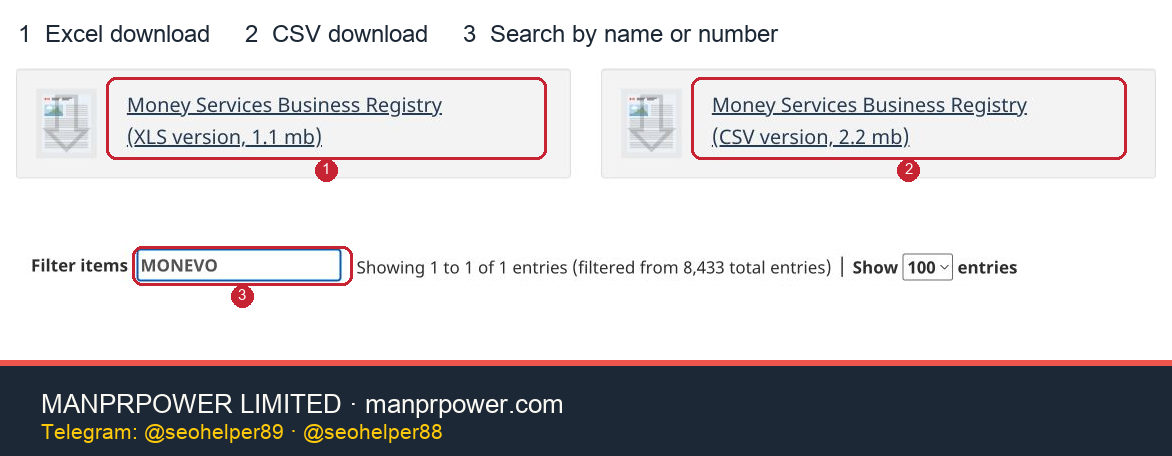
Screenshot source: FINTRAC Money Services Business Registry, English page, 2026-09-11; red boxes added by MANPRPOWER LIMITED. Registry data is used under the Open Government Licence – Canada. View the full-resolution image
Following Figure 1:
- Red box 1 — XLS version: downloads the official Excel registry. The button says XLS, but the file that arrives today is
.xlsx. - Red box 2 — CSV version: downloads the CSV, which suits spreadsheet or data tools. For simple viewing, start with Excel.
- Red box 3 — Filter items: type the legal name, operating name or registration number of one business here. The screenshot uses the operating name
MONEVO, which narrows the page to a single record. Clear the previous term before you search for a different business.
Every screenshot below comes from the same English page session on 2026-09-11. The examples show how to read fields; they are not a recommendation or endorsement of any business, and real verification means opening the official page again.
Start with Excel the first time
The Excel version suits direct viewing and filtering. CSV is a plain-text data file, better suited to importing into other spreadsheet or data tools. Both only record what the registry contained at download time and never replace a later re-check.
- Download the
.xlsxfile, open it in Excel, keep the original and save a working copy. - Select the header row on the sheet that holds the data, then open Data → Filter. Menu names vary slightly between versions.
- With a registration number in hand, filter the MSB Registration Number column for it. If you only have a name, look in Organization Names (Legal and Operating) for the legal name or operating name. Clear the previous filter before switching to another business.
- Once you find a record, match the name, address and website against what the counterparty gave you, then read MSB Registration Status and MSB Registration Expiry Date. Do not filter for Registered alone; that hides the other statuses you may need to explain.
- Save the matching record, the search term, the download date and any unresolved differences. When a filter returns more than one row, keep every candidate and compare them one by one using the same-name method below.
Microsoft's guidance on filtering a range or table covers the mechanics. You can download the files on a phone, but column-by-column comparison is easier on a computer.
What if the CSV opens as garbage or lands in one column?
Import it in Excel through Data → From Text/CSV, choose comma as the delimiter in the preview, and confirm that names, numbers and statuses each land in their own column. The 2026-09-11 CSV from this site decodes as Windows-1252; if accented characters break, adjust the file encoding in the import preview. Whatever you download from the official site later, trust the preview you actually see.
Import identifying fields such as registration number and corporation number as text. Leave dates in their original form so Excel does not convert them into a different display. After filtering, save a .xlsx working copy if you need formatting or notes, and keep the original CSV as the reference. Microsoft's CSV import guide and the text import wizard explain the menu and column settings.
The columns that matter once you find a record
| English field | What it holds | How to use it | | --- | --- | --- | | Organization Names (Legal and Operating) | Legal name and operating name | Check the entity that actually signs the contract, not just a familiar brand | | MSB Registration Number | FINTRAC registration number | Locates the registration record, then cross-check it against name, address and website | | MSB Registration Status | Registration status | Read whether the record says Registered, Expired, Ceased or Revoked | | MSB Registration Expiry Date | Registration expiry date | Read it together with the current status; the date alone does not establish that registration lapsed | | Business Address / Website | Business address and website | Compare item by item against the details the counterparty supplied |
Status meanings follow FINTRAC's own description. Registration is not a licence and not regulatory endorsement. Where the expiry date has passed but the status still reads Registered, verify against the renewal guidance rather than deciding on the date alone.
After you find Registered, still confirm the entity
Confirm first that the legal name, registration number, address and website in the registry all belong to the same entity, then weigh the service categories, status and dates. Record the time of the search and any field still in doubt so a later review can pick it up.
The FINTRAC official Registry states that registration does not represent a licence, a registration certificate or regulatory endorsement. Its guidance on transactions adds that FINTRAC cannot assess how a business operates on a consumer's behalf or help recover funds.
What the Registry shows, and what it cannot prove for you
Section 54.1 of Canada's Proceeds of Crime (Money Laundering) and Terrorist Financing Act requires FINTRAC to establish and maintain the Registry and to make the identifying information defined in the regulations available to the public. The text of the section together with the registration regulations describes a defined public data set, not a company's full application file or supervisory record.
The Registry currently publishes fourteen fields: legal name and operating names, business address, website, services offered, registration status, registration number, date of initial registration approval, registration expiry date, cessation date, revocation date, jurisdiction of incorporation, corporation number, date of incorporation, and the Foreign MSB Indicator. The page states that every field is searchable and offers XLS and CSV downloads. For anyone running a check, those fields fall into four groups:
- Entity identity: legal name, operating names, address, website and registration number.
- Business outline: the declared service categories and whether the record is flagged as a Foreign MSB.
- Status timeline: initial registration, expiry, cessation and revocation dates, plus the current status.
- Corporate background: jurisdiction of incorporation, corporation number and date of incorporation.
These public fields help you judge whether the record matches the entity a counterparty claims to be, and what the record showed as of the data date. They cannot prove beneficial ownership, financial strength, client fund segregation, cybersecurity, complaint history, sanctions exposure, provincial licensing, banking relationships, or that every ongoing compliance obligation is met. A risk that does not appear in a public field is not a risk that has been ruled out.
A seven-step check: from name to evidence pack
Gather the documents before you open the page. With only a brand name in hand, it is very easy to conflate same-name companies, former operating names or lookalike websites. Ask the counterparty first for the legal name, operating names, FINTRAC registration number, corporation number, registered address, official domain and the services it claims to provide. Incomplete details do not prove anything is wrong, but they do mean you cannot yet complete an accurate match.
- Start only from the official entry point. Open the FINTRAC Money Services Business Registry and note the date and time of the search. Do not treat search-engine snippets, self-issued certificates, press releases or screenshots as current status.
- Search the full legal name first. Keep suffixes such as INC., LTD. or CORPORATION, then try versions without punctuation, spaces or abbreviations. If you only have a brand name, search it as the Operating Name as well and ask the counterparty to identify the matching legal entity.
- Reverse-search the registration number. A number is good for ruling out same-name entities, but it is not identity proof on its own. Confirm that the name, address, website and corporation details on the same row connect to the documents the counterparty submitted.
- Check the business outline field by field. See whether Services Offered covers what the counterparty is selling you, and whether the Foreign MSB Indicator is consistent with its stated place of business and client market. If a service the counterparty calls central does not appear in the record, ask for an explanation and postpone your conclusion.
- Read the status together with all four dates. Start with the current status, then read initial registration, expiry, cessation and revocation dates. A date is not a standalone status test; an expiry date in the past does not override a currently displayed Registered.
- Save evidence someone else can reproduce. Record the search term, matching row, registration number, status, key dates, page URL and search time. For higher-risk transactions, you can also keep the source hash of that day's CSV and the matching row, while avoiding copies of personal data into unrelated files.
- Move to the second layer of verification. After the Registry matches, check whether the corporate registration is in good standing, whether the relevant province imposes separate licensing or registration, whether the website matches the contracting entity, whether the receiving account belongs to the signatory, and how the terms handle client funds, refunds, freezes and complaints.
The value of these seven steps is reproducibility. A colleague who never ran the original search can still reach the same conclusion from the names, numbers, times and differences you saved. Writing only "FINTRAC checked" tells nobody whom you checked, when, or which fields matched, and it cannot support an approval decision later.
Same names, operating names and multiple results: how to rule out a mismatch
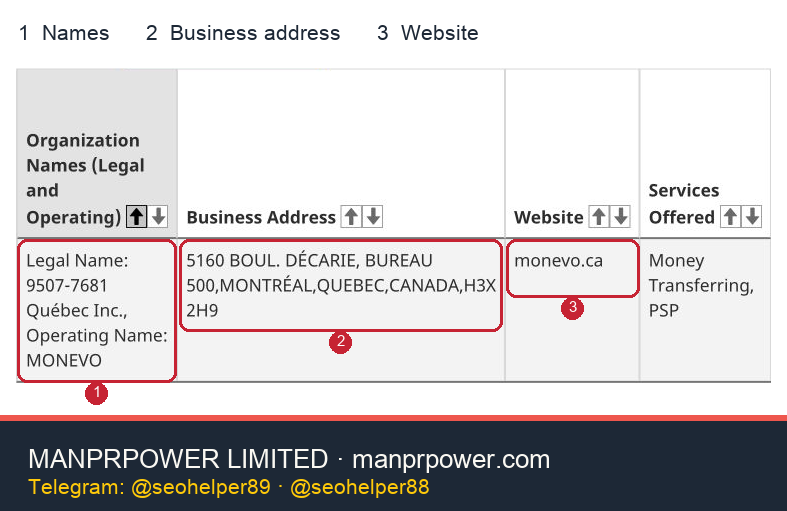
Screenshot source: FINTRAC Money Services Business Registry, English page, 2026-09-11; red boxes added by MANPRPOWER LIMITED. Registry data is used under the Open Government Licence – Canada. View the full-resolution image
Using Figure 2 to confirm the entity:
- Red box 1 — Names: distinguish Legal Name from Operating Name. In the example the operating name is MONEVO and the legal name is 9507-7681 Québec Inc.; check the contracting entity against the legal name.
- Red box 2 — Business address: compare street, city and postal code. A similar brand name cannot confirm identity on its own.
- Red box 3 — Website: compare the registry website against the one the counterparty supplied. This example shows monevo.ca; if they differ, write the difference down and verify it.
When several results appear, do not pick the one that looks closest. Treat each record as a separate candidate and eliminate them in a fixed order: registration number, legal name, corporation number and jurisdiction, address, website, service scope, and only then a similar operating name. Any conflict in a strong identity field stays on the list as an unresolved difference.
Same legal name, different operating name. The same entity may trade under a second brand, or the records may simply be out of step. Check the registration number, address, website and corporation number; treat the operating name as belonging to the same entity only when those strong fields connect.
Same operating name, different legal name. Never merge records because a brand matches. Ask the counterparty to name the entity that will sign the contract, issue invoices and receive funds, and that appears in the website's legal notice, then re-check that legal name and number.
Same name, different address format. Addresses differ through unit numbers, abbreviations or a move. In the historical 2026-08-24 CSV used in the appendix, one registration number appears on two rows because the address is presented differently, so equal row counts are not an identity test. Keep comparing numbers, corporation details, dates and websites, and confirm whether the business updated its information as required. FINTRAC's update guidance requires a registrant to notify FINTRAC within the set period when registration information changes.
Similar names, different numbers. Treat these as separate registrations. Do not infer a single entity from group relationships, a shared website or similar logos. If the counterparty cannot explain which number applies to this contract, record that the entity could not be uniquely determined rather than choosing on its behalf.
A defensible same-name conclusion needs at least two independent strong fields: the FINTRAC registration number plus one of a corporation number, a specific address or an official domain. For larger amounts, ongoing handling of client funds or cross-border transactions, verify the corporate registration and the contracting documents directly instead of relying on the Registry alone.
Reading the four statuses: status first, dates according to the handling rules
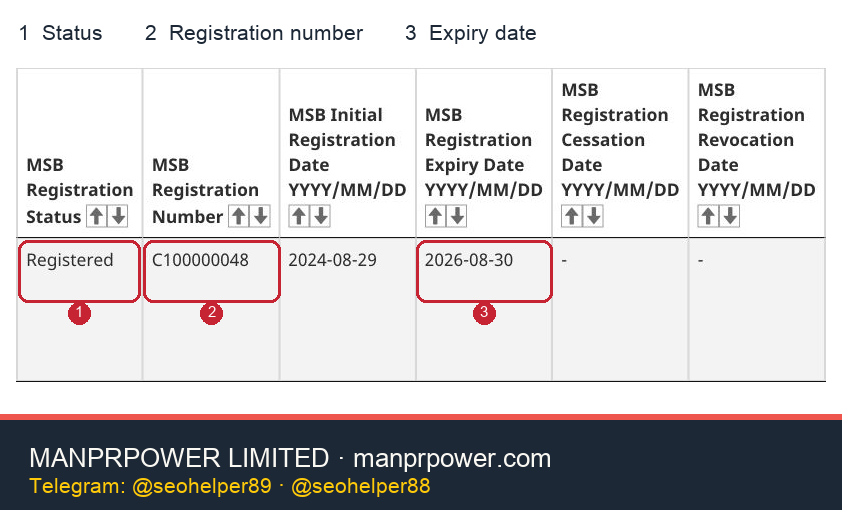
Screenshot source: FINTRAC Money Services Business Registry, English page, 2026-09-11; red boxes added by MANPRPOWER LIMITED. Registry data is used under the Open Government Licence – Canada. View the full-resolution image
Using Figure 3 to read status and date:
- Red box 1 — Status: this screenshot shows
Registered. Record the status on the day you searched; a screenshot with no date proves little. - Red box 2 — Registration number:
C100000048here. Paste it into Filter items to re-run the check, and compare the name, address and website again. - Red box 3 — Expiry date:
2026-08-30here. The screenshot date is later than that, yet the status still reads Registered, so the expiry date alone does not justify rewriting it as Expired. The official description lets a business that has already filed a renewal keep displaying Registered while the file is processed; the screenshot cannot show how far that business has progressed.
The official description of the FINTRAC Registry sorts records into Registered, Expired, Ceased and Revoked. The four words describe different situations and should not be flattened into "invalid" or "licensed".
Registered: currently shown as registered. The record sits in the current registered state in the Registry. That says nothing about FINTRAC having assessed product quality, solvency or transaction safety. Where the expiry date has passed but the status is still Registered, read it alongside the official renewal guidance: a business that files before expiry may keep displaying Registered while the file is processed.
Expired: no renewal after two years. FINTRAC marks a record Expired when the registrant did not file a renewal before expiry. Section 11.19 of the Proceeds of Crime (Money Laundering) and Terrorist Financing Act provides for renewal every two years; see the renewal provision and FINTRAC's renewal guidance. Expired is not the same as Revoked, and an old approval notice cannot establish that registration is still current.
Ceased: the business reported that it stopped the relevant services. This status follows a business telling FINTRAC that it no longer meets the MSB or FMSB definition, or has stopped providing the prescribed services. It does not necessarily signal a penalty, but it does mean the record cannot be used as a current Registered. If the counterparty claims to have resumed business, ask for fresh current Registry evidence rather than an old screenshot of the number.
Revoked: registration has been revoked and the business is no longer registered. The situations listed in FINTRAC's explanation of revocations include ineligibility, failing to respond to an explanation request within the deadline, failing to respond promptly to an information request, failing to notify a change of operating name or address, and failing to provide FINTRAC with assistance. Revocation follows a process and a reason, but the public registry does not necessarily give a due-diligence reviewer the whole case file; do not invent a sequence of events from a status alone.
In practice, record the page's current status first, then explain the related dates. When status, dates, counterparty documents or website copy conflict, keep the finding open rather than editing one of them into the answer you were hoping for.
How to use the registration number, expiry date and Foreign MSB Indicator correctly
The registration number exists mainly to locate one FINTRAC registration and to rule out same-name entities. It is not a licence number, a credit score or a quality rating. FINTRAC's registration guidance explains that an approved registration receives a number and that some information then appears in the public Registry; the statutory registration requirement sits in PCMLTFA section 11.1. Neither fact turns the number into a guarantee about how the business operates.
The expiry date helps you schedule a re-check and understand the renewal cycle, but it must be read with the status. If a Registered record expires soon, set a re-verification before and after that date in the approval conditions. If the date has already passed, record "currently still shows Registered" plus the search time, note that the file may be in renewal processing, and do not strike it out on your own authority.
A Foreign MSB Indicator of Yes means the Registry flags the record as a foreign MSB. FINTRAC's summary of an FMSB is a business with no place of business in Canada that directs services at the Canadian market and provides prescribed services to clients in Canada. Whether that applies still turns on the facts, and the official applicability checker helps you test services, place of business, market direction and client location. An Indicator of No or Not Selected does not replace checks on place of incorporation, actual place of business and client market either.
When nothing matches, records conflict, or a record was just updated
An empty result only means your current search term did not hit the public record you were shown; it does not immediately prove that the business was never registered. Check spelling, former names, operating names, legal suffixes and punctuation, then search the registration number, corporation number, address or website fields. If the business recently changed its name, moved, ceased or filed a renewal, remember that the Registry updates monthly.
If the record still does not appear, ask the counterparty for a verifiable legal name and number, and for a statement of which entity bears this contract, the receipt of funds and the services. An approval email or a certificate-style document from the counterparty is material to be checked, never a substitute for the current official status; FINTRAC states that it does not provide enquirers with business information beyond what the Registry already publishes, as set out in the official Registry description.
Where the name and number match but the website, address or service scope conflicts, split the conclusion: "the registration record exists and currently shows Registered; website ownership, address updates and the services in the proposed transaction are not yet verified." That formulation is more accurate than blanket approval or rejection, and it gives the business team something actionable when deciding whether to request more documents, cap exposure or pause the transaction.
If you are the business itself and find inaccurate public information, use FINTRAC's current update or renewal process rather than only editing your website or writing your own explanation. If you are an external reviewer, ask the registrant to correct it; do not submit regulatory filings on its behalf.
Turning a registry check into counterparty due diligence
A public registry check is a starting point, not a finish line. FINTRAC's overview of MSB and FMSB obligations shows that registration sits alongside a compliance programme, client identification, record keeping and reporting of specified transactions as continuous duties. An outsider cannot judge how well those duties are performed from the Registry alone, which is why evidence has to be collected in layers.
Layer one: entity identity. Check the legal name, corporation number, jurisdiction of incorporation, registered address, actual business address, official domain, contract header and account name. When the entity shifts, re-run the check instead of blending a parent, a subsidiary and a brand.
Layer two: FINTRAC records. Keep the registration number, current status, all four dates, service categories and Foreign MSB Indicator. Every conclusion carries the search time, and important payments or launches justify another check.
Layer three: corporate and provincial records. Confirm the corporation is in good standing, that directors or registration details match the contract, and whether the relevant province or activity adds registration, licensing or consumer-protection requirements. Federal FINTRAC registration does not automatically substitute for a provincial regime.
Layer four: commercial and funds terms. Read the service terms, fees, refunds, account freezes, dispute handling, the path client funds take and the data-processing terms. FINTRAC states that it cannot approve, cancel or delay a transaction and cannot help recover funds; those commercial risks remain with the parties, as its guidance on transactions sets out.
Layer five: risk and controls. Depending on transaction size and risk, verify beneficial owners, sanctions and adverse information, the compliance officer, policy summaries, independent review, data security, insurance or financial information. Which documents are reasonable depends on your risk, your authority and your privacy obligations; do not collect personal data you do not need simply to close a checklist.
Pause the approval and escalate in any of these situations: the contracting entity cannot be uniquely determined; the counterparty's number belongs to another company; the current status is not Registered yet the counterparty claims normal provision of the relevant services; service categories plainly do not fit the proposed transaction; the receiving account has no explainable link to the contracting entity; the business refuses to explain a key difference; or FINTRAC registration is being marketed as government assurance of returns, fund safety or reputation.
Write the final record as more than pass or fail. A more useful format separates verified facts, unresolved differences, risk impact, document requests, the next review date and the accountable approver. That is how Registry evidence enters a real procurement, partnership or compliance decision.
Frequently asked questions
What can the FINTRAC MSB Registry List show?
It is searchable by name, address, website, services, status, number, the four status dates, jurisdiction of incorporation, corporation number, date of incorporation and the Foreign MSB Indicator. The web page suits a single lookup, while CSV or XLS suits bulk filtering and preserving evidence of your method. Record the search date for either route.
When searching by company name, should I use the legal name or the operating name?
Use the legal name to establish the entity first, then search the operating name as a supplement. With only an operating name, obtain the matching legal name and registration number; an identical operating name does not prove an identical entity.
Do I need a FINTRAC Login to read the public Registry?
The public Registry is open for browsing and download. Do not confuse it with the forms a business uses to register, update or renew. As a counterparty you neither need nor should request the other side's regulator account, password or login screenshot.
Does FINTRAC issue an MSB licence or registration certificate?
No. In both the Registry and its consumer guidance, FINTRAC states that it does not license regulated businesses or issue registration certificates. A business may receive an approval notice and a number, but that should not be presented as a licence or regulatory endorsement.
Why does the status still say Registered after the expiry date?
A business that filed a renewal before expiry may keep displaying Registered while FINTRAC processes the file. Record the status, the expiry date and the search time when you check; do not let the date override the current status, and do not read the rule as indefinite validity.
A one-page registry check template
Copy these fields into your due-diligence working file and fill in only what you actually found:
- Subject of the check and business purpose:
- Date, time and person conducting the search:
- Official Registry URL used:
- Search terms and name variants:
- Legal name / Operating Name:
- FINTRAC registration number:
- Current status:
- Initial registration / expiry / cessation / revocation dates:
- Address, website and Services Offered:
- Jurisdiction of incorporation, corporation number and date of incorporation:
- Foreign MSB Indicator:
- Fields consistent with the contract, receiving account and official website:
- Fields inconsistent or unverifiable:
- Second-layer corporate, provincial, sanctions or terms checks:
- Current conclusion, limitations and next review date:
Appendix: historical CSV snapshot of 2026-08-24
The figures below come from the official CSV downloaded on 2026-08-24 and show how to read the registry. The date differs from the 2026-09-11 copies above, so these are not current business counts or statuses; the original checksum and the recalculation method are kept with the article's research material.
Without de-duplication, the CSV holds 8,302 rows: 3,752 Registered, 2,535 Expired, 1,610 Ceased and 405 Revoked. De-duplicated by non-empty registration number, 8,301 unique numbers remain, of which 3,751 are Registered; the difference comes from one registration number appearing on two rows under two address formats. These are data rows or unique registration numbers, not 8,302 distinct businesses.
After normalising the Foreign MSB Indicator for case, 475 rows read Yes, 7,540 read No and 287 read Not Selected. That reflects the flags in the downloaded file, not an independent legal assessment of each business in this article. Service categories also allow one record to select several items, so adding the category counts does not produce a business total.
One more easily misread result: among the 3,752 Registered data rows, 141 show an expiry date earlier than 2026-08-24, 3,610 show that date or later, and one is empty. That pattern cannot be rewritten as 141 Expired records, because the Registry's renewal guidance states that a business filing before expiry stays Registered while FINTRAC processes it, and Expired appears only when the renewal was not filed in time.
This is a dated snapshot, not a permanent list of businesses. FINTRAC states that the Registry updates monthly; every external conclusion should state the search time and re-open the page before an important transaction.
Source note: existing regulatory and historical snapshot material was verified on 2026-08-24; the download entry points, file formats, usage walkthrough and Registry status descriptions were reviewed on 2026-09-11. Historical snapshots keep their original dates. Re-verify official records before any material transaction, and have a qualified professional review the current facts where a specific regulatory judgement is involved.
SOURCES
Sources
- FINTRAC: Money Services Business Registry
- FINTRAC: Money Services Business Registry CSV
- FINTRAC: Conducting transactions with a money services business
- FINTRAC: Register your MSB or FMSB
- FINTRAC: Update, Renew or Cancel your registration
- FINTRAC: Money services businesses with revoked registration
- FINTRAC: Check whether you need to register
- FINTRAC: Money services businesses obligations
- Justice Laws: PCMLTFA section 11.1
- Justice Laws: PCMLTFA section 54.1
- Justice Laws: PCMLTFA section 11.19
- Justice Laws: PCMLTF Registration Regulations
- FINTRAC Registry original Excel file
- Government of Canada Open Data: Money services business registry
- Open Government Licence – Canada
- Microsoft: Filter data in a range or table in Excel
- Microsoft: Import or export text (.txt or .csv) files
- Microsoft: Text Import Wizard